


Guests have always compared your hotel against the one down the road.
They did it with two tabs open, in their own head, and you never saw it happen.
Booking[dot]com now runs that comparison for them, inside the search results, by ticking between two and five properties and putting them side by side.
Desktop only, nothing on mobile and nothing in the app, and the same feature was already there in January 2015.
The rows are easy enough to list, and they are the least interesting part of this.
Why an OTA builds this.
At the end of a search the guest is left with a handful of properties that all clear the same bar.
Without a clear answer on what separates two hotels, the guest postpones or books elsewhere.
My guess is that this is where BO and the other OTAs see the biggest risk of losing the booking.
The compare table is aimed at that point in the search.
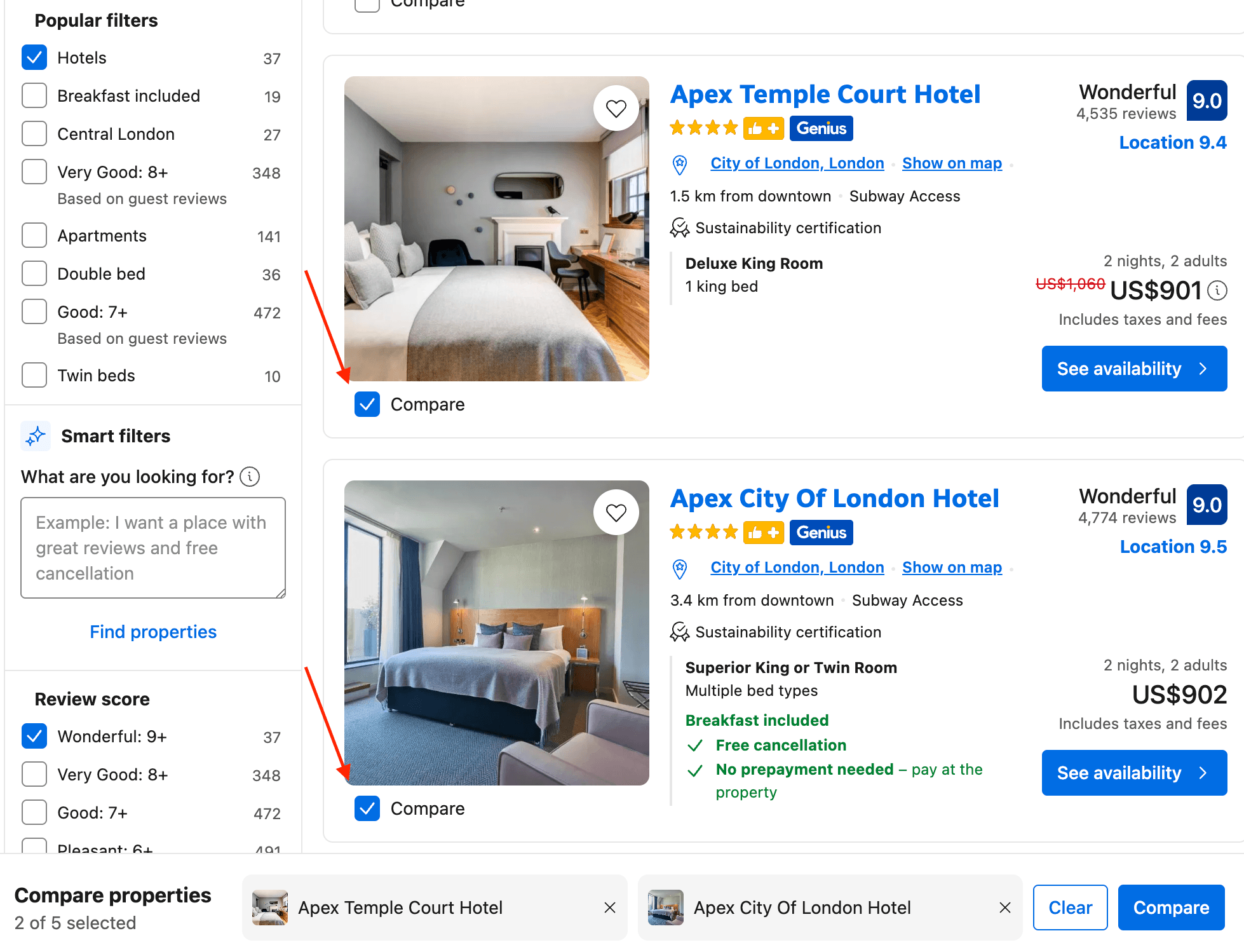
Hotels.com has had the same thing inside Smart Shopping for a while, up to five properties on price, star rating, review score, refundability and main amenities.
Getting onto that shortlist in the first place is a separate problem with its own logic, covered in how OTA rankings work.
This one starts after the shortlist exists.
Why a guest uses it.
OTAs are the master of puppets when it comes to flattening branding and whatever makes a property distinctive, so all of that stays less visible there than anywhere else.
Two hotels that are genuinely different can end up looking interchangeable on a results page, and a property in a high category can end up looking a lot like a much more modest one.
The compare table brings some of that back, by highlighting specific features that normally remain hidden but could play a role in a traveller’s decision.
It lands in the consideration phase rather than discovery.
In discovery the guest uses the OTA filters for the non negotiables, a 9+ score, breakfast included, that kind of thing.
The table becomes useful once that list is already short.
At that point the softer preferences come up, a terrace or some outdoor space, things that don’t decide a booking on their own but can tip it between two similar options.
What changes for your hotel.
The comparison is not new, and the guest was going to make it anyway.
Today it happens through a fixed set of declarations: price, review score, distance from the centre, facilities, meals, and the room name exactly as it was typed into the extranet.
Inside that table your property is represented by what it declared about itself.
The table rewards the property that filled its fields in, ahead of the property that is better.
A three star with every field in order can beat a four star that left half of them blank.
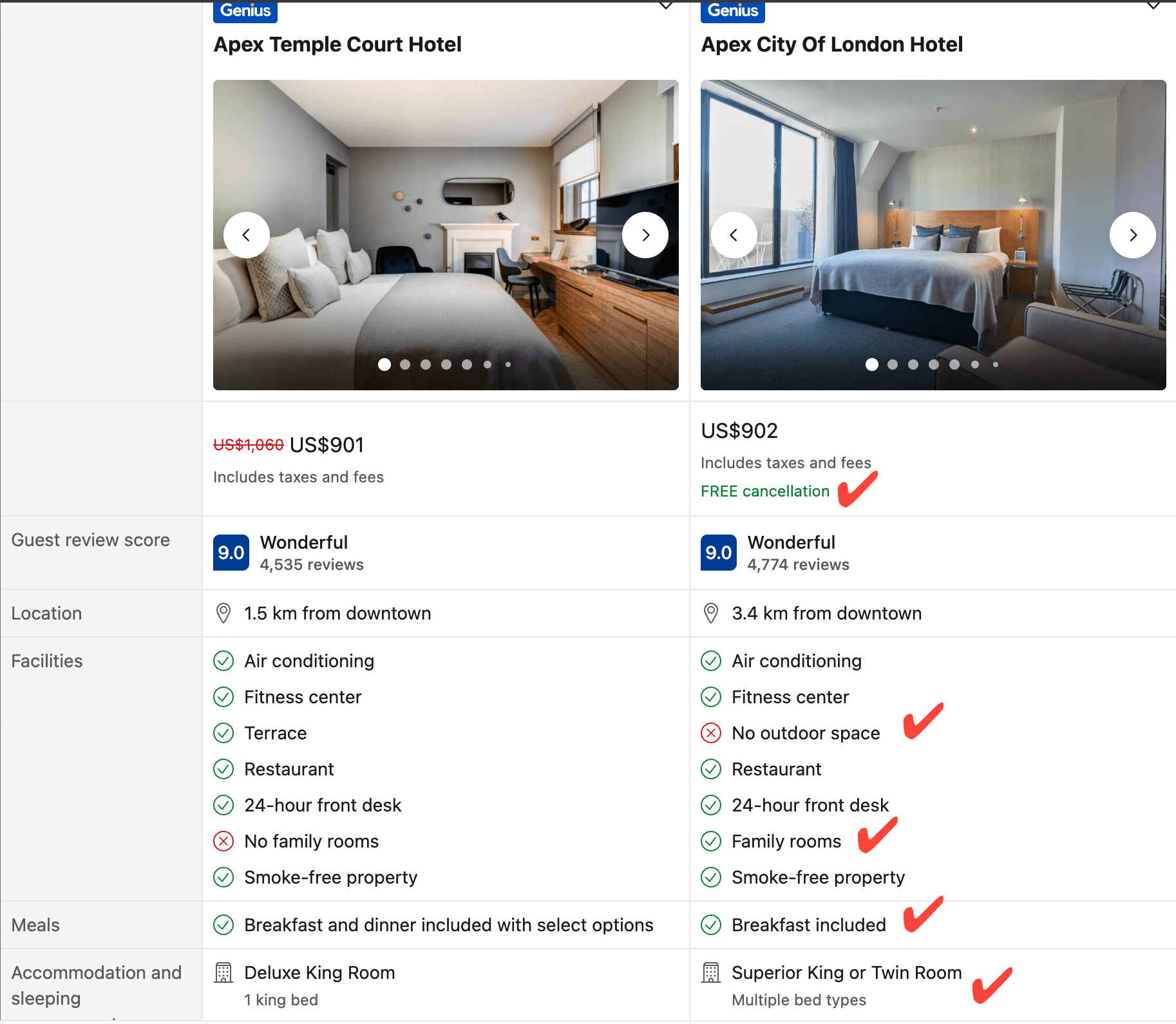
Two hotels of the same group show what that looks like: same area of London, both four star, both sitting at 9.0, one at US$901 for two nights and the other at US$902.
Five rows separate them, free cancellation on one, a terrace on the other, family rooms, the meal plan and the room name.
Not one of the five says anything about what staying in either hotel is like.
Free cancellation carries more weight in that pair than anything either building has, and free cancellation says nothing about the quality of a hotel.
The same thing works in favour of groups running more than one property in a destination, where the main difference is the position against a point of interest and the table brings the smaller things into view as well.
What cannot be represented in there.
Whatever a property has built outside those fields has no row of its own.
Years spent on service and on the people behind the desk have nowhere to go in that table.
The properties that pay most for this are the ones that invested in what does not fit in a field.
Comparison tools aimed at guests have a history in this industry, and not always a flattering one.
What the rows really are is attributes, and attribute based selling has been discussed as an opportunity for years, which it is.
Inside a comparison table those same attributes also work as a limit on what can be said about a property at all.
The absences stop being invisible.
On a listing page, a facility a property does not have is simply not shown.
In the table it is printed as No outdoor space, with a red X against it, next to a green tick belonging to the property beside you.
Losing that row because the building has no outdoor space is one thing.
Losing it because nobody ever ticked the box in the extranet is another.
The second kind of loss is the one worth working on.
So it helps to sort the rows by how much control a hotel actually has over each one.
What a hotelier can govern.
- Filled in, at no cost. The facilities declared in the extranet, the room name and its description, and the bed type. Nobody charges for any of it.
- Decided commercially, and reversible. Cancellation policy, whether breakfast is included, the price itself, whether a flexible rate sits alongside a non refundable one. These carry a real cost, and the table puts that cost in a column.
- Structural, and not going anywhere. Distance from the centre, outdoor space, star category. A competitor two streets closer to the centre keeps that row forever.
- Built over time. Review score and review count. The only rows nobody can fix in an afternoon.
Most of the frustration of losing a comparison gets spent on the third group.
Nothing can be done about that one.
The comparison follows the guest to your own site.
A guest who has just put four properties side by side arrives on a hotel website with those questions in mind, in that order.
They want the price with the taxes already in it, the cancellation terms, how far the hotel is from the thing they came for, whether breakfast is in or out, and what the room in the photograph actually contains.
Most hotel websites do not answer any of that in a form anyone can compare.
The questions guests ask on hotel websites turn out to be remarkably consistent, and they line up with what the OTA now puts in a column.
The comparison happens either way.
The only choice on the hotel side is whether the direct site gives a guest anything to compare with, which is the least glamorous part of a direct booking strategy and one of the few parts that costs nothing to fix.
Two questions to sit with.
Worth ticking your own box against two neighbours once, to see which rows you lose on.
How many of those rows are genuinely about your hotel, and how many are fields nobody ever filled in?
And if you had to explain the difference between you and the hotel down the road using only what fits in an extranet field, what would be left?

![Why More Direct Bookings Can Mean Less Total Revenue [thumbnail]](https://www.directyourbookings.com/wp-content/uploads/2026/01/Why-More-Direct-Bookings-Can-Mean-Less-Total-Revenue-thumbnail.jpg)


